SaaS Inspiration Hub
A free Chrome New Tab extension for SaaS founders, entrepreneurs, and tech enthusiasts. A central hub of inspiration, news, and innovation that keeps you informed, motivated, and productive as you build and scale your business, every time you open a tab.
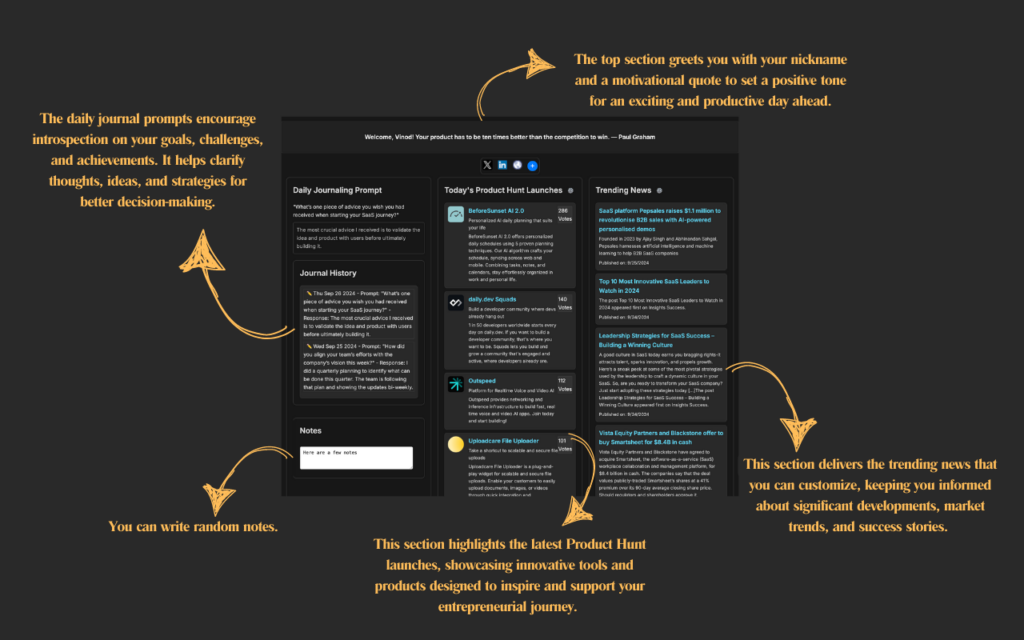
Your new tab, reimagined for founders
Install once, then just open tabs
Easy setup
Install the extension and it instantly turns your new tab into a personalized dashboard.
Personalized experience
Save your nickname and get a customized greeting whenever you open a new tab.
Quick access
Get all the information you need without leaving your browser.
Up and running in seconds
- 01Open a new tab to view the extension.
- 02Save your nickname to get a personalized greeting.
- 03Write and save your journal entry or quick notes.
- 04View and edit past entries in the history section.
- 05Customize your Product Hunt feed with filters for time frame and upvotes.
Open source, MIT licensed
The full source is on GitHub under the MIT License. Fork it and submit pull requests for improvements or new features. A few of the core functions:
displayRandomJournalPrompt()Displays and saves a random daily prompt.
saveJournalEntry()Saves the journal entry with date, prompt, and response.
editJournalEntry()Edits both the prompt and response of a journal entry.
updateJournalHistory()Shows the journal history with editing options.
fetchProductHuntLaunches()Fetches Product Hunt launches with time-frame and upvote filtering.
displayProductHuntLaunches()Displays launches with custom styling and a vote-box design.
Frequently asked questions
How do I install the extension?
Visit the Chrome Web Store, search for "SaaS Inspiration Hub," and click "Add to Chrome." Once added, it automatically opens in your new tab. You can also open it directly from the Web Store listing.
Can I customize the content shown on the new tab?
Yes. You can personalize your experience by setting a nickname, and more customization features may be added in the future.
How do I update or delete my saved preferences?
Open the new tab page, modify the input fields, and click save. Your changes are stored locally in your browser.
What data does the extension collect?
The extension stores your nickname and preferences locally using Chrome's Storage API. No sensitive personal data is collected or shared.
How can I report an issue or suggest a feature?
We value your feedback. Email us at contact@laksha.net with any issues or suggestions and we'll use them to improve the extension.
How often are the news and quotes updated?
SaaS news and motivational quotes update every 4 hours. Product Hunt launches refresh weekly so you stay up to date.
Is the extension free to use?
Yes, it is completely free. We may introduce premium features in the future, but the core functionality will stay free.
Still need help? We aim to respond within 24 hours. Email contact@laksha.net.
Open a tab. Get inspired. Build.
Add the extension to Chrome today and transform your browsing experience. Stay inspired, stay informed, and keep building.